


BimmerCode for BMW and MINI
4.21.00K Reviews
App Specs
- Version
- 5.1.1-13473
- Updated On
- License
- Free
- Downloads
- 1,000,000+
- Developer
- SG Software GmbH & Co. KG
- Categories
- Auto & Vehicles
- Platform
- Android, iOS
Screenshots
 Analysis by AppCompare
Personalizing a BMW or MINI can mean more than choosing a trim or adjusting a seat. With BimmerCode, I can change supported vehicle settings from a phone, giving me a way to tailor parts of the car’s behavior and displays without treating every adjustment as a workshop project. What matters most is not the sheer number of possible changes; it is being deliberate about which ones make daily driving feel better.
A phone-based way to tailor your BMW or MINI
BimmerCode is an Auto & Vehicles app from SG Software GmbH & Co. KG. It is free to download, rated for Everyone, and has a 4.3 average from around 11,000 ratings, with over 500,000 installs. The current version is 4.29.0-12906, and it requires Android 6.0 or later. In-app purchases are available at $49.99 per item, so I would check the options relevant to my car before assuming every part of the experience is included at no cost.
The app’s central appeal is coding supported BMW, MINI, and Toyota Supra settings through a phone connection to the vehicle. In practical terms, that can let an owner adjust certain convenience and display behaviors that may be set differently from the factory. I find that more useful than making changes simply because they are available: a small adjustment that fits a regular commute can matter more than a long list of novelty options.
It is important to approach the idea with the right expectation. This is not a general car-maintenance app, and it does not turn a phone into a replacement for a mechanic or diagnostic service. Its value is in vehicle personalization. If I am trying to troubleshoot a mechanical fault, arrange a service visit, or compare repair estimates, I would choose a tool intended for that job instead.
How coding fits into an ordinary routine
In use, the process depends on connecting the phone to the car with a suitable OBD adapter. That extra piece of hardware is part of the setup, not an optional detail to overlook when deciding whether the app is convenient. Adapter compatibility matters, so I would check that a particular adapter works with both the phone and the vehicle before buying it. Once connected, the app presents coding choices for the vehicle rather than asking me to write code by hand.
A sensible first session is a planned one, not something I would squeeze into the last minute before leaving. I would park safely, make sure the phone and connection are ready, and decide on one change before opening the relevant setting. The useful discipline here is to avoid changing several unrelated items in one go. If the result feels wrong, changing one setting at a time makes it much easier to identify what to undo.
For example, imagine I regularly park on a narrow street and want a supported mirror-related convenience setting to suit that routine. I can first check whether the option is offered for my vehicle, read the app’s explanation, and save the original configuration before applying a change. Then I can use the car normally and decide whether the adjustment genuinely helps. That slower approach may sound less exciting than experimenting with everything at once, but it gives me a clearer answer and a better path back if I change my mind.
Worth Reading Before You Choose

EA SPORTS FC Mobile 26 Is a Bigger Football Game, but It Takes Time

Flipboard Shows What News Apps Must Do Beyond the Feed

Switching to Android Auto Means Rethinking Your Driving Routine

Google Calendar Makes a Crowded Week Easier to Manage

Ludo King Makes the Most of the Minutes Between Plans

Baby Panda World Brings Quick Play to Modern Phones, but Its Game Library Feels Busy
Before coding, I would also confirm that the car is the exact vehicle selected in the app and that the connection is stable. A setting available on one model or configuration should not be assumed to work on another. The practical rule is simple: treat the choices shown for the connected vehicle as the boundary, read each warning, and do not try to force an option just because another owner has described it.
Why saving the original settings matters
One of the most useful habits is making a backup before editing. That gives me a reference point if I want to return to the previous configuration, and it helps take the pressure out of trying a modest change. A backup is not a reason to be careless, though. I would still read the explanation before confirming anything and avoid starting the process when I cannot give it my attention.
Warnings and descriptions are particularly valuable for owners who are new to vehicle coding. They help make the choices less opaque, but they do not remove the need to understand what I am selecting. When wording is unclear or a setting seems beyond my comfort level, the prudent move is to leave it alone rather than guess. The convenience of a phone interface should not be mistaken for a guarantee that every option is suitable for every car.
There is also a practical trade-off in changing settings: a preference that looks appealing in a menu may become annoying after a week of driving. I would test changes in familiar conditions and note what I altered. If I later decide a display or convenience behavior is distracting, having made one change at a time and kept the original settings makes it easier to reverse course without wondering which of several edits caused the difference.
What it does better than general car apps
Compared with the usual alternatives in the auto-app category, BimmerCode has a narrower purpose. General driving or maintenance apps tend to focus on records, reminders, routes, or vehicle information; this app is for changing supported settings in compatible vehicles. That focus is its strength if personalization is the goal, but also a reason to skip it if I mainly need routine maintenance tracking or help diagnosing a fault.
It is also a different proposition from asking a workshop to make a change. A phone-based workflow gives an owner more direct control over supported adjustments, while professional help is the better route when I am unsure what a setting does, when a problem needs diagnosis, or when I would rather not interact with vehicle coding at all. I would not treat the app as a substitute for expert advice in a situation involving safety or a persistent vehicle issue.
The adapter requirement is another point of comparison. An app-only tool is easier to try immediately, whereas coding requires compatible hardware and a vehicle connection. That makes BimmerCode less spontaneous than opening a basic car companion app, but the connection is what allows it to work with vehicle settings. For someone who expects to make one change and never use it again, the extra setup may not feel worthwhile.
Who is most likely to enjoy it
I see the clearest fit for BMW and MINI owners who already know what they want to change, enjoy careful tinkering, and are comfortable checking compatibility before acting. It can also suit someone who wants to make a small quality-of-life adjustment and is willing to spend time reading the prompts rather than treating coding as a one-tap trick. The app’s broad adoption and solid average rating suggest many owners find this sort of customization useful, though those figures cannot tell me whether a particular setting suits my own car.
On the other hand, I would steer away from it if I am uneasy about changing vehicle settings, do not want to purchase or manage an adapter, or expect the app to repair a fault. It is also not an ideal choice for someone who wants every vehicle feature to be available regardless of model or configuration. The most satisfying experience is likely to come from having a specific, modest goal and checking that the car supports it before getting started.
My own advice is to begin with a convenience change rather than a cosmetic novelty, keep a record of what I alter, and give each adjustment a few ordinary drives before deciding whether it belongs. That workflow turns the app from a menu of tempting possibilities into a more controlled way to personalize a car. If I cannot explain why I want a particular setting, I would leave it untouched.
When it comes to personalizing your BMW or MINI, the BimmerCode app is like having a magic wand in your pocket. I’ve always been a fan of tweaking and customizing my ride, so naturally, I had to give this app a whirl. Let me take you through my journey with it and see if it’s the right fit for you.
Getting Started with BimmerCode
First things first, downloading the BimmerCode app was a breeze. It’s available on both Android and iOS, so no worries about compatibility issues. Once installed, you’ll need a suitable OBD adapter to connect your phone to your car. I opted for the recommended Vgate iCar Pro, and it synced up without a hitch.
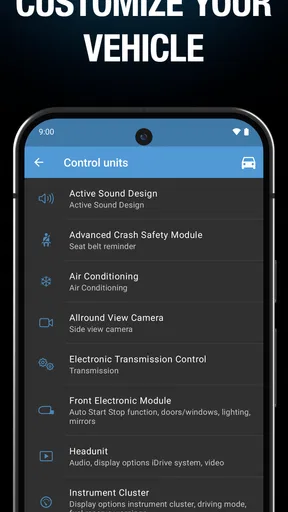
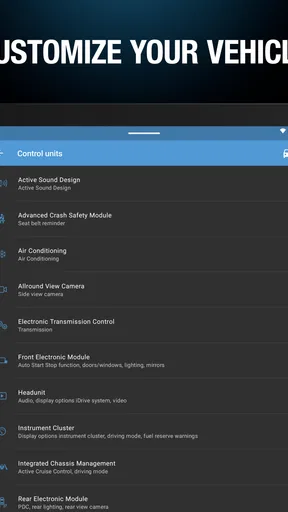
Opening the app, I felt like I was entering a treasure chest of options. The interface is sleek and user-friendly, which is a big plus for those of us who aren’t exactly tech wizards. The main screen offers a straightforward layout, making navigation super easy.
Features That Stand Out
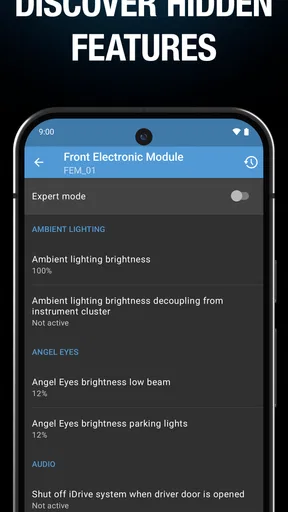
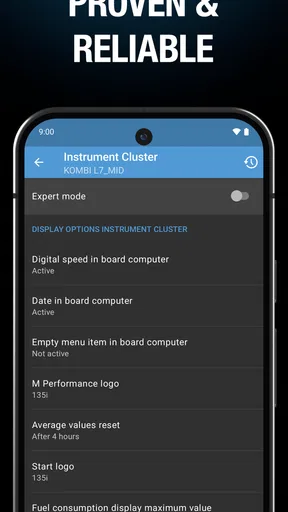
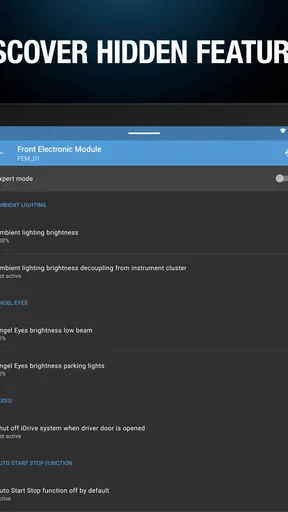
This app’s real charm lies in its ability to unlock a plethora of customization options. You can tweak everything from the interior lighting to the digital speedometer display. I was particularly impressed by the ability to enable features that are often locked by default. Imagine being able to automatically fold your mirrors or activate the digital speed display with just a few taps.
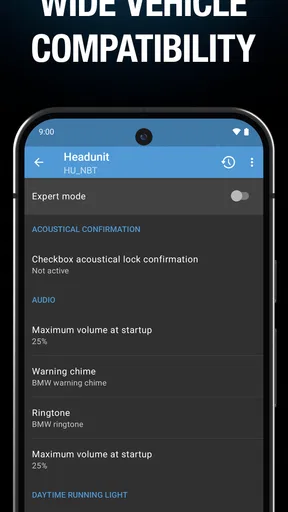
One of my favorite features is the coding for the iDrive system. It allows you to customize the startup animation and even add the M logo if you’re into that kind of thing. The possibilities seem endless, and it’s all laid out in a way that’s easy to understand.
Safety and Usability
Now, I know what you’re thinking: "Is all this safe for my car?" The app provides clear warnings and explanations before you make any changes. It’s like having a cautious friend by your side, ensuring you don’t overstep any boundaries.
That being said, it’s always wise to know what you’re doing. The app offers a backup feature, so you can save your original settings before diving into the customization pool. This safety net is a lifesaver for those moments when you might accidentally enable something you didn’t mean to.
Performance and Support
Performance-wise, the app runs smoothly. I didn’t encounter any lags or crashes during my testing. The developers seem committed to keeping the app updated, which is crucial for compatibility with newer car models.
And if you ever find yourself stuck, the app’s support team is pretty responsive. I reached out with a question and received a helpful response within a day. They also have a comprehensive FAQ section that covers most of the common queries.
Who Is It For?
If you’re someone who loves tinkering with your car to make it truly yours, this app is definitely worth checking out. It’s not just for tech-savvy folks; even I, with my limited coding knowledge, found it accessible and fun to use.
However, if you’re someone who’s a bit wary of making changes to your car’s system, you might want to proceed with caution. It’s all about knowing your limits and being comfortable with the adjustments you’re making.
Overall, the BimmerCode app offers a fantastic mix of customization, ease of use, and safety features. It’s a game-changer for BMW and MINI owners who want to add a personal touch to their rides. So, if you’ve been itching to unlock some hidden features in your car, this might just be the app you’ve been waiting for.
Pros
- User-friendly interface simplifies coding.
- Supports a wide range of BMW models.
- Frequent updates ensure compatibility.
- Offers extensive customization options.
- Clear instructions for beginners.
Cons
- Requires additional OBD adapter purchase.
- Limited functionality on some models.
- Potential warranty issues with coding.
- App crashes occasionally reported.
- Not all features are free.
FAQs for BimmerCode for BMW and MINI
What is BimmerCode and what can it do for my BMW or MINI?
BimmerCode is an app that allows BMW and MINI owners to code their vehicles using their smartphones. It enables users to unlock hidden features and customize various settings, such as lighting, dashboard displays, and more, without needing a professional service. It's a handy tool for personalizing your driving experience.
Is BimmerCode compatible with all BMW and MINI models?
BimmerCode supports a wide range of BMW and MINI models, but compatibility can vary depending on the vehicle's production year and specific model. It's important to check the app's official website or support documentation to ensure your vehicle is compatible before downloading and using the app.
Do I need any additional equipment to use BimmerCode?
Yes, to use BimmerCode, you'll need an OBD-II adapter, which connects your phone to your car's system. BimmerCode recommends specific adapters for optimal performance, such as the OBDLink MX+ or Vgate iCar Pro. Ensure the adapter is compatible with both your vehicle and smartphone.
Is it safe to use BimmerCode for coding my car?
BimmerCode is generally safe to use, provided you follow the instructions carefully. However, coding your vehicle can have risks, such as voiding warranties or causing functionality issues if done incorrectly. It's crucial to back up your car's original settings before making any changes and proceed with caution.
Can I revert changes made with BimmerCode?
Yes, BimmerCode allows you to revert any changes made. The app provides an option to back up your car's original settings, enabling you to restore them if needed. It's recommended to create a backup before starting any coding to ensure you can easily return to the original configuration.


